CLAUDE VIDEO EDITING
Can Claude edit videos? Yes — in Claude Code, on a real timeline
The Claude web chat cannot scrub clips or export MP4 — Inside Claude Code, Claude Motion adds a multi-track HyperFrames timeline for animated B-roll, data callouts, narrated explainers and deterministic 1920×1080 MP4 renders
Creator from $19.9/mo · Works with Claude Code & Codex · Independent, not affiliated with Anthropic
A paid Creator or Studio subscription is required — There is no Free plan
HYPERFRAMES TIMELINE · TRACK 0 SCENES · TRACK 8 VOICEOVER
TEXT
CHARTS
INTERACTIONS
AUDIO
RUNS ON YOUR OWN CLAUDE CODE OR CODEX · MULTI-TRACK HYPERFRAMES STUDIO · LOCAL 1920×1080 MP4
A multi-track HyperFrames timeline for Claude Code
Prompt-only video generators force you to re-roll a whole clip when one title is half a second late. Running claudemotion edit opens HyperFrames Studio in your browser against the local index.html composition so you and your agent edit the exact same file.
Scrub and trim numbered tracks
Scenes sit on track 0, titles and callouts on track 1, animated charts on track 2, voiceover on track 8 and music on track 9.
Drag handles or ask in terminal
Adjust data-start and data-duration on the timeline, or tell Claude Code which clip ID to shorten or restyle.
Automatic overflow & number check
claudemotion check verifies every slide for clipped text, console errors and exact numbers from your source file.

Where Claude shines — and where your NLE stays faster
Treating an AI coding agent like Premiere leads to frustration on raw camera footage, while hand-keyframing every chart or callout in After Effects burns hours. Split the edit along what each tool actually does well.
Animated B-roll, openers & data cards
Describe the point or pass a report; Claude Motion builds timed typography, ECharts and comparisons ready to drop over A-roll.
Full explainers from docs or decks
Turn a .docx, .pptx, .pdf or script into a sequenced multi-scene video with synced English or Chinese narration.
Rough camera cuts vs fine NLE editing
Claude Code can trim silences or concatenate files via FFmpeg, but multi-cam pacing, color and audio mixing belong in your NLE.
| VIDEO TASK | BEST SETUP WITH CLAUDE | FIT |
|---|---|---|
| Animated B-roll, titles & chart callouts | Claude Code + Claude Motion | Strong — editable tracks |
| Doc, PPT or PDF to narrated explainer | Claude Code + Claude Motion | Strong — source-checked |
| Batch trim, concat or silence cut | Claude Code + local FFmpeg CLI | Good for scripted batch ops |
| Multi-cam talking head, color & mix | Premiere / Final Cut / Resolve | Use your NLE, import MP4 B-roll |
Render deterministic 1920×1080 MP4 on your machine
When the timing looks right, claudemotion render captures the composition frame by frame through local Chrome and FFmpeg into out/render.mp4 — ready to import into any timeline editor or upload directly.
Local MP4 render, zero visual credit burn
Rewriting scenes, retiming clips and re-rendering MP4 locally use zero Claude Motion credits.
Synced voiceover stretches the cut
claudemotion voice generates natural English or Chinese narration and automatically extends each scene to fit.
Optional interactive web version
Publish the same composition as a public, unlisted or password link with live ECharts, quizzes and view stats.
Note: HyperFrames renders solid-background 1920×1080 MP4 clips (no transparent alpha channel), designed as full-frame B-roll cutaways or standalone scenes.
Get started
Start from a motion style
Pick a curated style for consistent typography, colors and chart themes across every B-roll cutaway, or let your agent design freely.
- LaunchMotion · Product launch scenes
- CreatorMotion · A-roll & B-roll explainers
- HyperFrames · Full launch films
- HyperFrames · Full launch films
- ink-editorial
- soft-clay
- watercolor-story
- Art stylesalchaincyf/huashu-art-motion· MIT
- HyperFrames · Full launch films
- HyperFrames · Full launch films
- Multiple visual stylesbangtutorial/bang-motion· MIT
- teaching
Everything included in the workflow

Motion styles
Preview styles on your own content before building.

Animated ECharts
Bar, line, pie, funnel and radar charts driven by the clock.

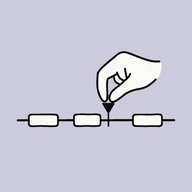
HyperFrames timeline
Visual multi-track scrubbing and clip trimming.
Document & deck ingest
Pulls structure and figures from .docx, .pptx, .pdf and URLs.
Voiceover sync
English and Chinese narration with pronunciation overrides.

Background music
Generate an instrumental track now or add one later.

1920×1080 MP4 export
Local, frame-accurate rendering via Chrome and FFmpeg.
Hosted share links
Public, unlisted or password web playback with analytics.
How to edit video with Claude Code and Claude Motion
- 1Cut your main talking-head or screen recording in your usual video editor.
- 2Give Claude Code your script or report to build animated B-roll scenes and charts.
- 3Fine-tune timing in HyperFrames Studio, render 1920×1080 MP4 locally, and drop the clips onto your timeline.
First run opens your browser to sign in — one click, no terminal.
Your questions, answered
Does Claude have a built-in video editor?
Claude chat on the web does not include a video timeline or MP4 exporter. Anthropic offers a beta Motion artifact on Team and Enterprise plans for prompt-generated animations, while Claude Motion adds a local HyperFrames timeline editor and MP4 renderer inside your own Claude Code or Codex.
Can Claude edit my raw camera MP4 footage?
In Claude Code, Claude can run local FFmpeg commands to trim timestamps, concatenate clips or strip silence, which works well for batch operations. However, Claude Motion itself is not a camera footage NLE — it creates and edits animated graphics, data scenes and narrated explainers that you export as 1920×1080 MP4 and place into Premiere, Final Cut or DaVinci Resolve.
Is there a Claude video editing skill I can install?
Yes. Installing Claude Motion adds skills for source ingestion, motion composition, self-checking, timeline editing (claudemotion edit) and voiceover inside Claude Code, OpenAI Codex or OpenCode.
Can Claude Motion export transparent lower-third overlays?
No. Local rendering outputs standard 1920×1080 MP4 video without an alpha channel. Use it for full-frame B-roll cutaways, chapter cards, animated charts and standalone explainers rather than transparent overlays.
How much does video editing with Claude Motion cost?
Browsing motion styles is free after connecting an account. Building, editing on the HyperFrames timeline, rendering MP4 and publishing share links start on the Creator plan at $19.9/mo (or Studio for higher limits). Visual edits and local MP4 renders consume zero credits; credits are only used when generating AI voiceover, music or images.
Is Claude Motion made by Anthropic?
No. Claude Motion (claudemotion.design) is an independently operated product that runs inside your own Claude Code or Codex agent and is not affiliated with Anthropic, PBC.